Restream External Stream Sources
Ant Media Server (AMS) can handle a variety of streaming flows. It can accept and create streaming media as well as pull live streams from external sources such as live TV streams, IP camera streams, and other types of live streams.
The stream sources that Ant Media Server can fetch are: RTSP, RTMP, HLS, SRT, UDP, FLV, etc.
To restream from an external source, follow these steps:
- First, log in to the management panel. Select live from applications, and click on New Live Stream > Stream Source. Define stream name, stream URL, and stream ID.
- AMS starts to pull streams.
- As the stream starts to pull, you can watch it from the AMS panel.
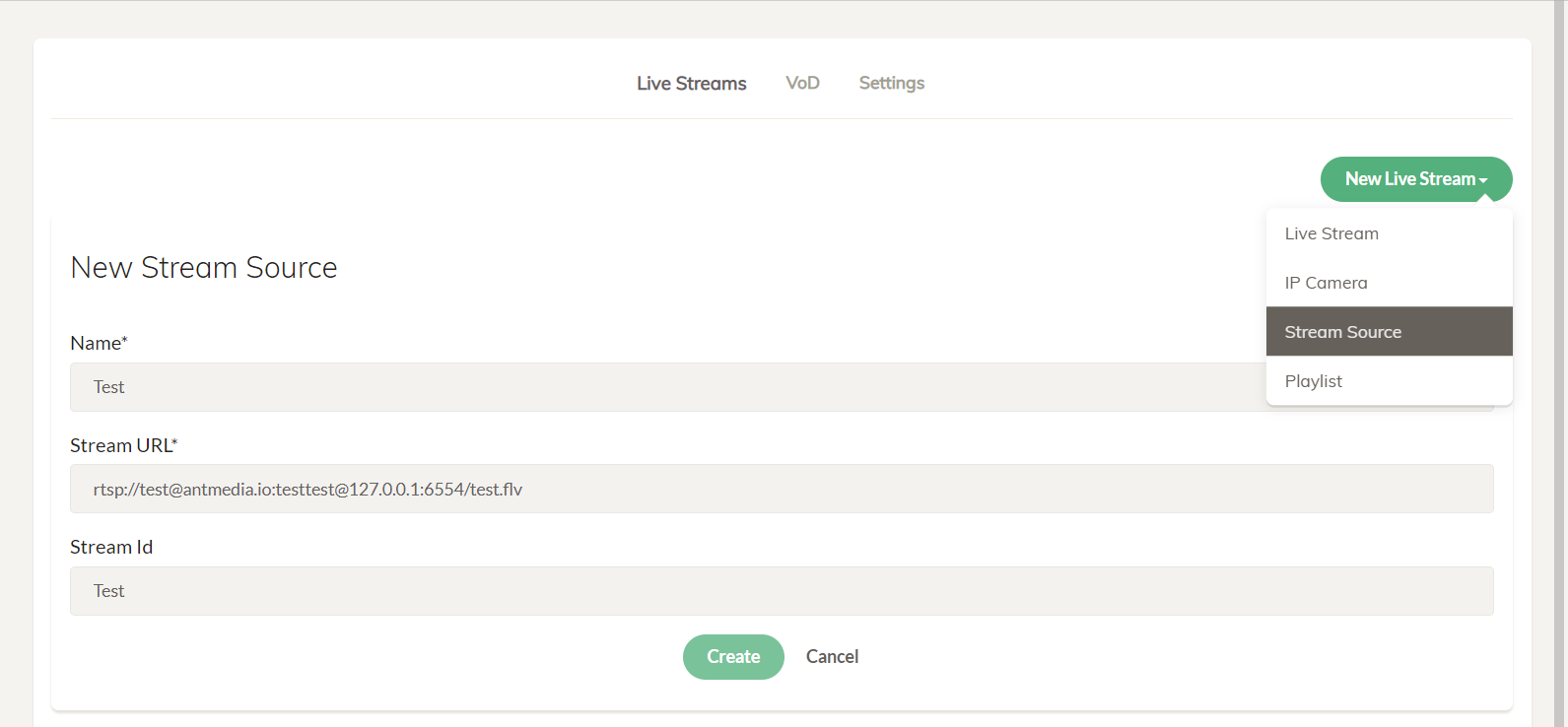
Make sure that the port that you are using to pull the stream source should be whitelisted on the firewall to avoid any issues.
In AMS versions 2.5.3 and later, the stream auto-fetcher is disabled by default. To enable automatic fetching of streams after a server restart, modify the following setting in the Advanced Application Settings:
"startStreamFetcherAutomatically": true,
Check out the recording documentation to record the source streams on the Ant Media Server.
Add RTSP Source with Video or Audio Only
The allowed_media_types parameter can be added as the parameter with the RTSP URL to enable audio/video only.
- Audio Only
rtsp://username:password@IP-address:Port/Streaming/Channels/101?allowed_media_types=audio
- Video Only
rtsp://username:password@IP-address:Port/Streaming/Channels/101?allowed_media_types=video
Restream UDP Source
For stream sources like RTSP, RTMP, etc., you can directly pull the stream as it is already available. However, to send a stream to AMS using UDP, you must first publish it to the server and then pull it.
To pull the UDP stream on a server as a stream source, follow these steps:
-
First, send the stream with UDP to the Ant Media Server IP address using an encoder or FFMPEG. In this example, we used the FFMPEG command.
ffmpeg -f lavfi -re -i smptebars=duration=60:size=1280x720:rate=30 -f lavfi -re -i sine=frequency=1000:duration=60:sample_rate=44100 -pix_fmt yuv420p -c:v libx264 -b:v 1000k -g 30 -keyint_min 120 -profile:v baseline -preset veryfast -f mpegts "udp://server-IP:5000?pkt_size=1316"You can change the port number as per your requirements. We published the stream on port 5000. Also, make sure that the used port is whitelisted on the firewall.
-
Once the stream starts pushing on the server's IP address, you can pull it (udp://127.0.0.1:5000) as a stream source on Ant Media Server.
Rest API to add Stream Source
This Rest API can be used to create the live stream.
curl -X POST -H "Content-Type: application/json" "https://IP-address-or-domain:5443/App-Name/rest/v2/broadcasts/create?autoStart=false" -d '{ "type":"streamSource","name":"test",
"streamId":"test","streamUrl":"YOUR_STREAM_SOURCE_URL"}'
Stream Source Connected! 🎉
You've successfully configured Ant Media Server to restream content from an external source. Whether it's an RTSP feed from an IP camera, an HLS playlist, or a UDP stream, your AMS is now pulling and broadcasting it seamlessly.
Your live stream is now ready for playback via WebRTC, HLS, DASH, or LL-HLS. Great job — your content is live and accessible!