Securing the REST API
This guide explains how to control REST API security on Ant Media Server. You can secure your REST services using the IP Filter feature.
IP Filter for the REST API
If you want only certain IP addresses to access REST APIs, add IPs or IP ranges in the Dashboard > {Application} > Settings > IP Filter Settings panel.
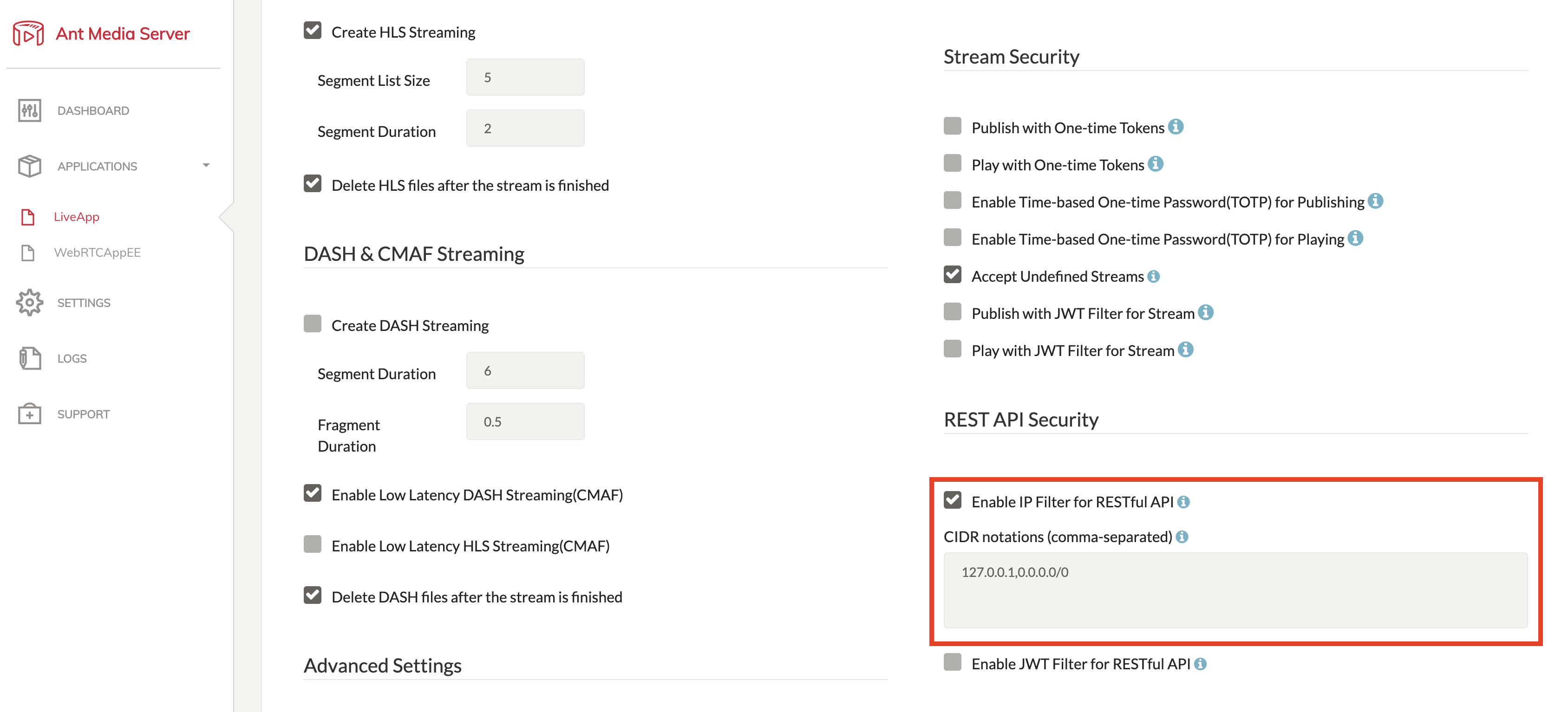
If 127.0.0.1 is removed, requests from the server (localhost) will be blocked. Devices on the same network can still access the REST API, but external devices cannot unless explicitly added.
Here is a demo of how to configure the IP filter

IP Filter for the Web Panel Access
To control which IPs can access the Web Panel:
-
Open
/usr/local/antmedia/conf/red5.propertiesfile using SSH. -
By default, all IPs have access:
server.allowed_dashboard_CIDR=0.0.0.0/0 -
Update the configuration according to your CIDR notation. You can also use multiple comma-separated CIDRs:
server.allowed_dashboard_CIDR=13.197.23.11/16,87.22.34.66/8 -
Save the file and restart the Ant Media Server:
sudo service antmedia restart
Now only IPs within the specified CIDR blocks can access the Web Panel.
Congratulations!
With the IP Filter configured, your Ant Media Server is now more secure. Only trusted IPs can access the REST API and Web Panel, protecting your server from unauthorized access while still allowing legitimate management and control. Your setup is now safe, flexible, and ready for production use.